広告のパーソナライゼーション、リマーケティング、広告のパフォーマンス分析など、広告に使用されるクッキーを管理します。
3.6.9. Configure domain for SendPulse
Attention!
The domain must be serviced on our NS. If the domain is serviced on third-party NS, actions need to be performed not with us, but in the panel of their owner.Automatic setup
Use presets from the "SendPulse" group.
Manual setup
- Obtain SPF/DKIM record data in SendPulse:
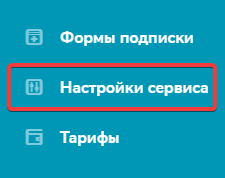
- In the SendPulse control panel, open the "Service settings" section:
- Opposite "Authentication (SPF and DKIM records)," click "Connect":

- In the "Sending domain name" field, enter your domain (without the
http://orhttps://protocol) and click "Get SPF/DKIM records": As a result, the data of both records will be displayed: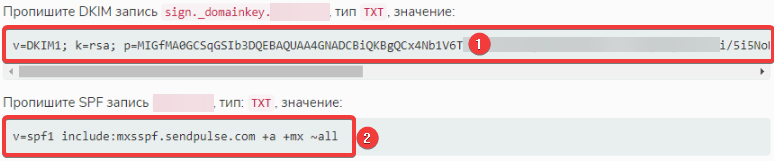
- Add the two received records with the following data:
- DKIM:
- "Subdomain" —
sign._domainkey. - "Type" — "TXT".
- "Data" — DKIM record data (marked with the number 1 in the screenshot).
- SPF:
- "Subdomain" — empty.
- "Type" — "TXT".
- "Data" — SPF record data (marked with the number 2 in the screenshot). Use the appropriate record format depending on the domain's MX records and the location of the site:
v=spf1 include:mxsspf.sendpulse.com ~allv=spf1 include:mxsspf.sendpulse.com +a ~allv=spf1 include:mxsspf.sendpulse.com +a +mx ~all
- Wait for the DNS cache update. This usually takes several hours (a maximum of 24).