広告のパーソナライゼーション、リマーケティング、広告のパフォーマンス分析など、広告に使用されるクッキーを管理します。
4.3.1.2.3. Access to WebMail.Online calendar via CalDAV
All WebMail.Online calendars are stored on our server cal.dav.broker and synchronized using the CalDAV protocol. If necessary, they can be additionally synchronized with third-party mail clients that support this protocol.
Credentials for connect
- In WebMail.Online, open calendar settings.
- On the "CalDAV" tab, copy the credentials and use them to set up synchronization in your mail client:
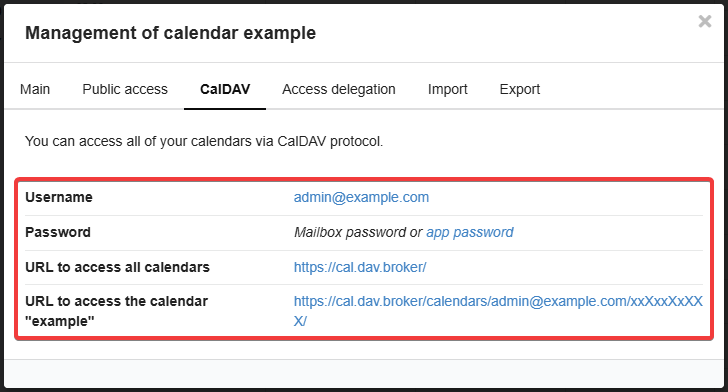
- "Username" — name of the mailbox with calendar.
- "Password" — use the password for the mailbox with the calendar (or app password, if configured).
- "URL to access all calendars" — link to access all calendars in the mailbox.
- "URL to access the calendar" — link to access the selected mailbox calendar.
Third-party mail clients
CalDAV support
Not all mail clients have built-in support for CalDAV synchronization. For example, WebMail classic cannot connect to calendars via a link.- Open Thunderbird.
- In the side menu, switch to the calendar (or press Alt+3).
- In the lower left corner, click "New Calendar" and select "On my Network".
- Enter the credentials to connect to the calendar (or all calendars) and click the continue button:
- "Username" — name of the mailbox with calendar.
- "Location" — link to access the mailbox calendar.
- "This location doesn't require credentials" — disabled.
- "Offline Support" — doesn't matter.
- Enter the password for the mailbox with the calendar.
- Select the desired calendars from those available and click "Subscribe".
- Open Betterbird.
- In the side menu, switch to the calendar (or press Alt+3).
- In the lower left corner, click "New Calendar" and select "On my Network".
- Enter the credentials to connect to the calendar (or all calendars) and click the continue button:
- "Username" — name of the mailbox with calendar.
- "Location" — link to access the mailbox calendar.
- "This location doesn't require credentials" — disabled.
- "Offline Support" — doesn't matter.
- Enter the password for the mailbox with the calendar.
- Select the desired calendars from those available and click "Subscribe".