広告のパーソナライゼーション、リマーケティング、広告のパフォーマンス分析など、広告に使用されるクッキーを管理します。
4.2.2. Credentials for connect to mailbox
Data for connecting is also available in WebMail.Online in the "Settings → Security" section.
General settings can be viewed in the "Mailboxes" section in the "Settings" block: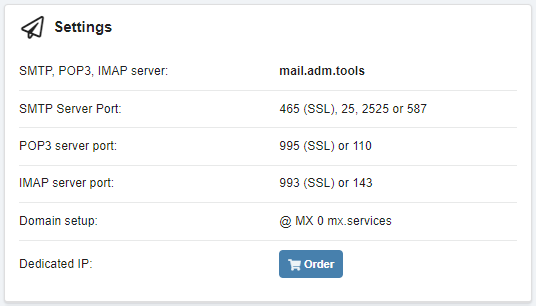
- Server —
mail.adm.tools(same for incoming and outgoing mail). - Ports:
- Incoming mail:
- IMAP (recommended):
143— without encryption.993— with encryption (SSL).
- POP3 (only receiving incoming mail, no synchronization):
110— without encryption.995— with encryption (SSL).
- Outgoing mail:
- SMTP:
587,25,2525— without encryption.465— with encryption (SSL).
- Login or username — full name of the mailbox.
- Password — mailbox password (not stored on the hosting).
Use this data when configuring a connection to a mailbox using mail clients and when configuring mail sending via SMTP in popular CMS (for example, WordPress, Joomla!, OpenCart, PrestaShop, Magento).
(4)