広告のパーソナライゼーション、リマーケティング、広告のパフォーマンス分析など、広告に使用されるクッキーを管理します。
2.3.3. Redis
Payment:
- On shared hosting the service is paid daily from the balance, on business hosting it is included in the plan price.
- When ordering for shared hosting, the balance must have an amount to pay for minimum 1 month of service usage.
- It costs more than a standalone service, but it runs faster because it is hosted on the same server as your hosting account and does not require a TCP connection.
Redis (REmote DIctionary Server) is a fast key-value data store in RAM. Redis due to its simplicity and high speed is used to organize caching, session management, publisher-subscriber systems and other tasks requiring maximum performance. Unlike Memcache(d), Redis allows storing not only strings, but also arrays, dictionaries, non-repeating sets, sorted sets, and other data structures. It also supports transactions (where either all or none of the operations are executed sequentially), batch processing of commands (first a series of commands are executed, then a series of results are produced).
Allocate memory
Important points:
- Memory is allocated for the whole hosting account without being divided by sites.
- Business hosting You can allocate no more than 1/4 of the plan's memory capacity. This limitation is due to the fact that a part of memory is required for scripts operation. If the allocated memory is insufficient, the oldest data in the cache will be overwritten.

Configure
Notes:
- PHP module PhpRedis is available by default on the hosting.
- You can test the Redis operation with test script.
Use the socket address from the "Redis" block to connect to the Redis server:
The port is usually not specified, but if the connection will not work without it, use 0 or 6379.
Instructions on how to configure Redis in various CMS and frameworks:
Statistics
Redis usage statistics are displayed in the "Redis" section: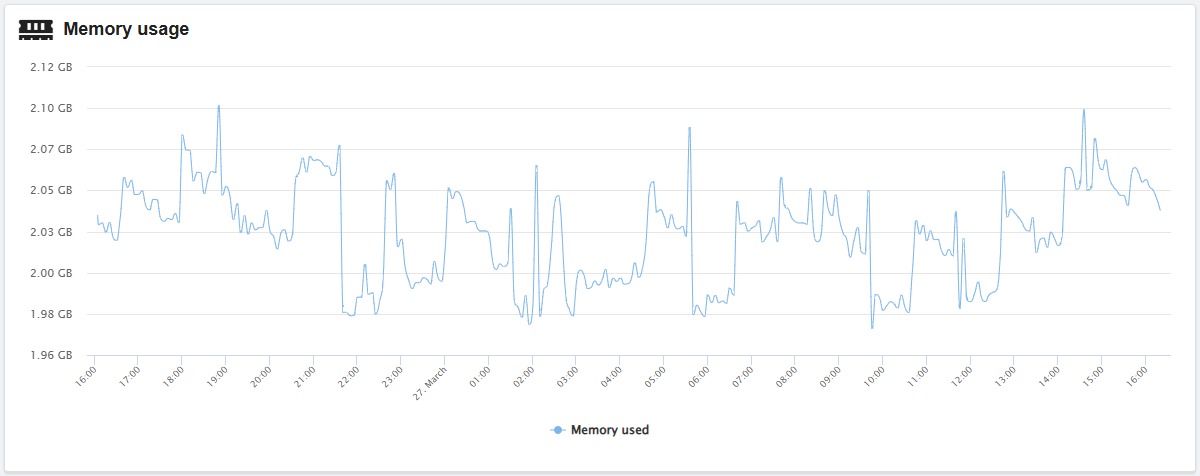

Clear cache
The temp-*.rdb files
Files liketemp-*.rdb are temporary database files that Redis creates during operation. If for some reason Redis terminates with an error (e.g., when the memory limit is reached) and the process is restarted, these files can remain in the cache directory. Files older than 30 days are automatically deleted, and can also be deleted manually if necessary.
The cache is stored in the ~/.system/redis/ directory.
- Open the "Redis" section.
- In the "Statistics" block, click "Clear cache".
In the main menu of the bot, select "Hosting → Hosting account → your hosting account → Clear cache → Clear Redis cache".